

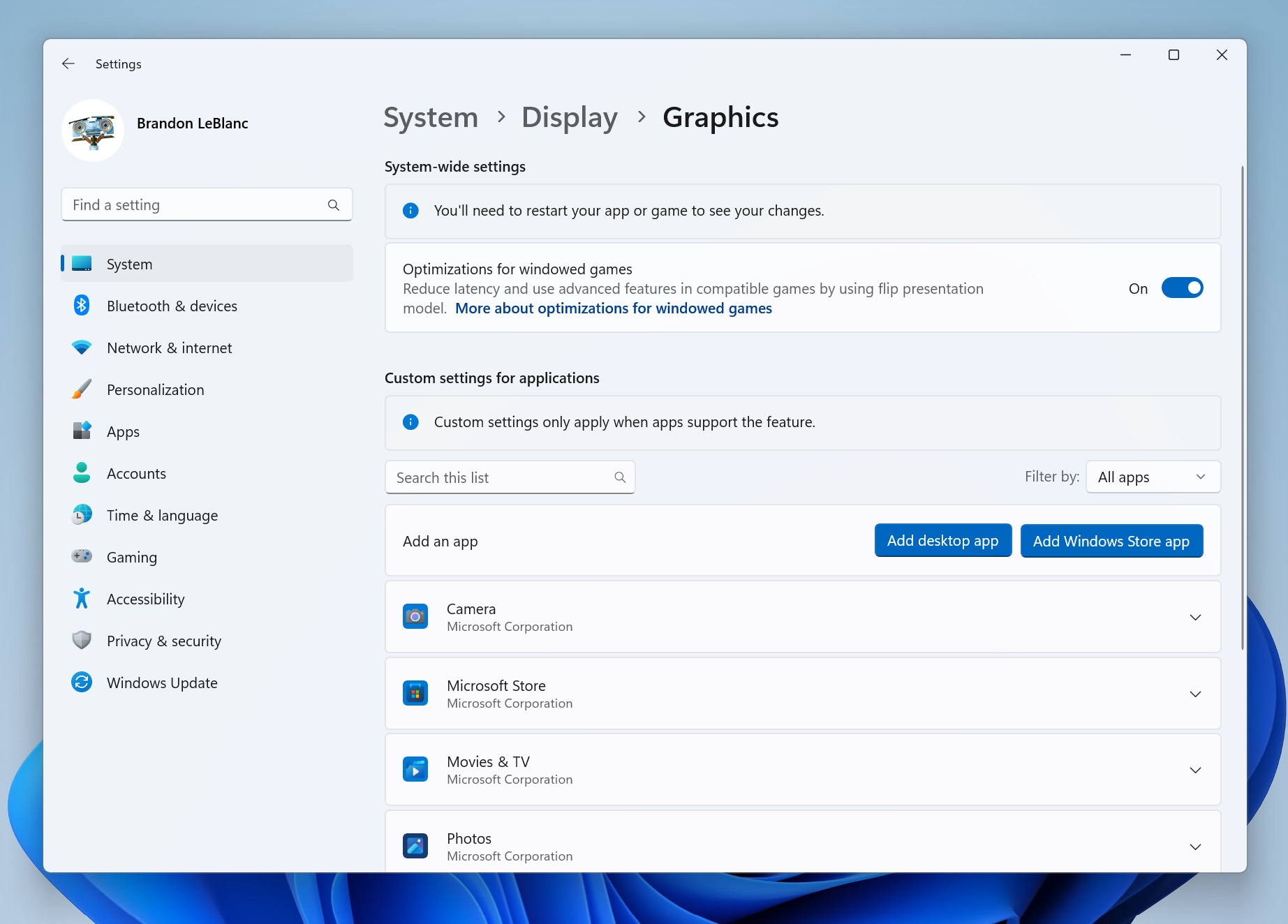
Microsoft has announced the release of Windows 11 Insider Preview Build 25281 to Dev Channel Windows Insiders. Microsoft has added several improvements to Windows Spotlight and also introduced a visual update to the graphics settings page. The build also includes bug fixes. Interestingly, Microsoft also enhanced the functionality of Notepad with the help of tabs. You can now work with multiple text files easily from a single Notepad instance via tabbed Notepad module.
The Windows 11 Insider Preview Build 25281 has introduced different treatments for the look and feel of Windows Spotlight. However, all treatments share existing core Windows Spotlight features such as desktop icon hovering, desktop icon right-clicking, and double-clicking respectively. The Windows Spotlight treatments include richer UI around the title and description.
You will also learn more information about the image displayed on your desktop. The update also includes different ways of swapping pictures with previews, a full-screen experience, and a minimized experience. The Windows Spotlight treatments are rolled out in a phased manner and it will take some time for you to experience the features. You can enable Windows Spotlight by hitting Start | settings | Personalization | Background and selecting “Windows Spotlight” from Personalize your background option.
The Windows 11 Insider Preview Build 25281 has added several improvements to Settings, Taskbar, File Explorer and much more. The graphics settings page has been redesigned with the ability to fetch graphics configurations such as GPU preference and Auto HDR easily. The visual appearance of the page has been streamlined.
The issue pertaining to Bluetooth and Devices has been resolved. The latest flight has updated the printer icon in the system tray to align with other modern icons. The issue related to WIN+T and arrow keys have been sorted out. The build has updated the error dialog when network discovery is switched off including File Explorer crash. The update also resolved several issues associated with Settings. If the Task View crashed upon selecting “show this group on all desktops”, then the issue has been resolved. The update related to Braille devices has been resolved.

more recommended stories
 Microsoft Releases Windows 11 Insider Preview Build 26236 To Canary Channel
Microsoft has released Windows 11 Insider.
 Microsoft Pushes Windows 11 Insider Preview Build 26200 With Bug Fixes
Microsoft has announced the release of.
 Windows Photos Gets Better with Microsoft Designer Integration
Microsoft has upgraded Windows Photos with.
 Windows 11 Gets Better With Widgets Board Improvements
Microsoft has released Windows 11 Insider.
 Release Preview Channel Gets Better With New Windows 11 Builds
Microsoft has released Windows 11 Builds.
 Microsoft Announces Windows 11 Insider Preview Build 26085: Check out the features
Microsoft has announced the release of.
 Notepad Gets Better With Spellcheck Functionality: Check out who’s eligible
Microsoft has started to roll out.
 Microsoft Starts Rolling Out Paint Update to Windows Insiders
Microsoft has started to push updates.
 AOMEI World Backup Day Giveaway: Grab Free Gifts For Your Ultimate Security
AOMEI is back with another massive.
 HP Unveils AI Powered Elite Series Laptops
HP has announced the launch of.
Leave a Comment